Claude’s Own Department of War: Building an AI Bridge for OpenXcom
Recently I stumbled upon OpenXcom — an open-source reimplementation of the original strategy XCOM: UFO Defense, a game I loved back in my school days. It was released in 1994, with tiny pixel soldiers and brutal difficulty, where you have to defend Earth from an alien invasion. It aged surprisingly well, with a loyal fanbase still going strong after thirty years.
I’ve been using Claude heavily at work lately, and while playing OpenXcom in a surge of nostalgia, I had this stupid idea — would it be possible to make Claude play it? Would it fail as miserably as I did, or would it do better?
Not so long ago, Anthropic made headlines by restricting some military applications of Claude, which made the Department of War unhappy. So it was decided. I’m going to build Claude its own Department of War. With blackjack and… well… aliens.
AI Bridge
The idea was simple: create a tool for AI that allows it to command soldiers during XCOM tactical missions. Gameplay is turn-based, which seemed perfect for an LLM to process. Strategic stuff, like base building and shooting down UFOs, I decided to leave out of scope.
I’m an iOS developer and have rarely worked with serious C++, so Claude Code, powered by Opus 4.6, did all of the heavy lifting. The plan was to fork OpenXcom and embed a TCP server directly into the game’s battle engine. The LLM connects, receives the game state as JSON, sends back commands, and the game executes them. And I’m just watching the show.
LLM Agent ←→ TCP/JSON ←→ OpenXcom Engine
                               ↓
       Human drinks beer and watches how Claude plays
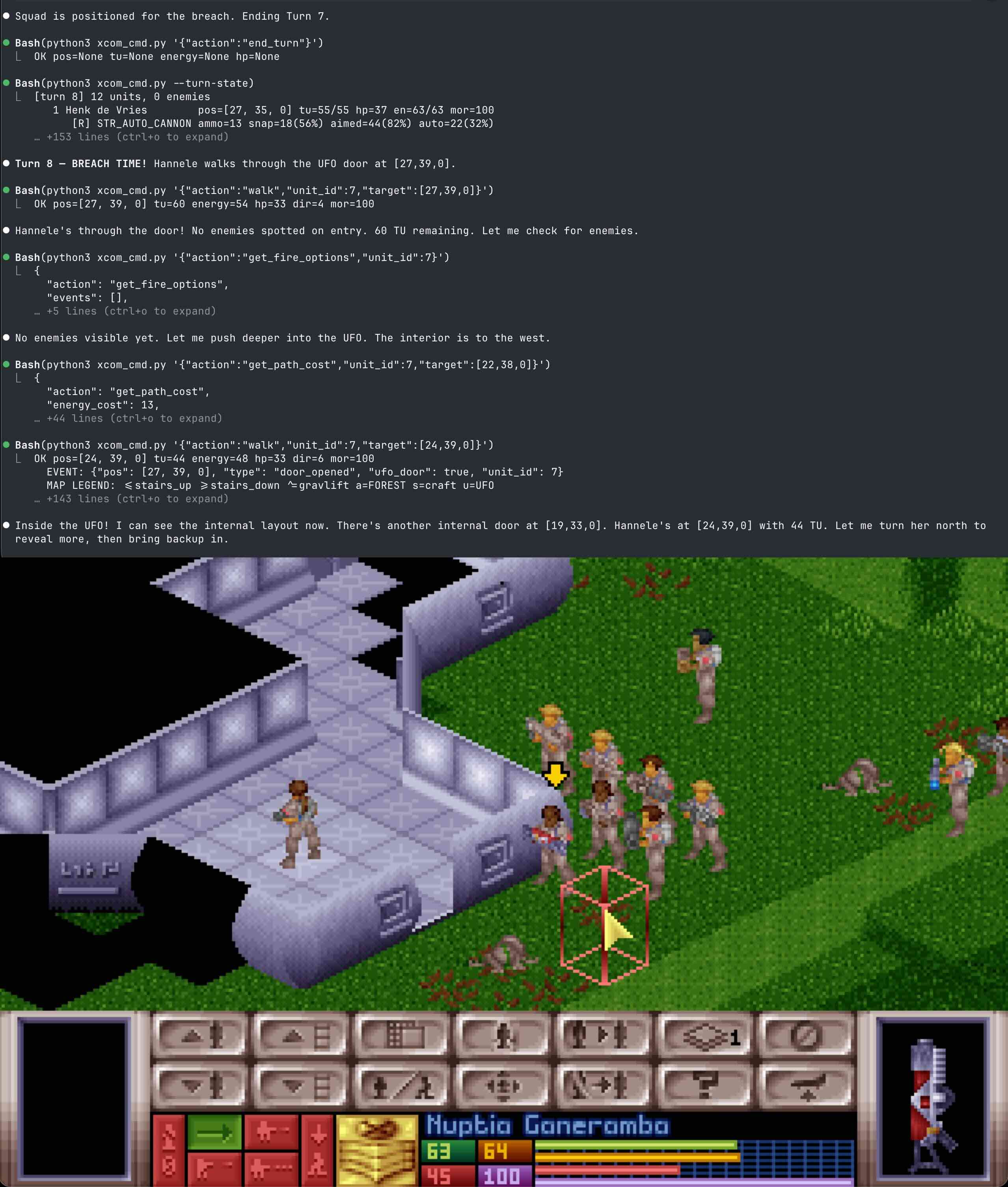
Here is a small example of what I got at the end — Opus via Claude Code leading a UFO breach:
But before we get to the fun part, there’s still some work to cover. The first step was to serialize the game down to the last tile — everything a human sees, the LLM should be able to see in the format it understands. Map layout, units, weapons, enemies — the entire game state, available as JSON on request.
Apart from that, the LLM needs to be able to send commands — move units, shoot, end turn — and the bridge needs to report all important events that happen during the mission. The LLM should know if it hits an enemy or misses, when a new enemy appears, or if something bad happens, like a soldier dying to reaction fire or an explosion. Sounds easy, right?
2x2 ASCII Map
The first challenge was giving the LLM the ability to “see” the map — as close as possible to how we humans see it.
Taking constant screenshots and feeding them to the LLM was a non-starter. An LLM can extract surprisingly little from a screenshot of the game. It can’t tell which pixel soldier is which, can’t extract coordinates, isometric objects overlap each other and the units, and on top of all that, the game has up to 4 vertical levels — you’d need a separate screenshot per level and somehow cross-reference them all. A nightmare.
So the map had to be delivered as text. The simplest first attempt was to serialize the entire map into pure JSON — throw it at the LLM and let it figure things out. Each tile would look something like this:
{
    "pos": [x, y, z],
    "floor_tu": 4,
    "has_wall_west": true,
    "wall_west_door": false,
    "has_wall_north": true,
    "wall_north_door": true,
    "has_object": true,
    "object_bigwall": 1,
    "terrain_level": -24,
    "smoke": 0,
    "fire": 0,
    "shade": 5,
    "grav_lift": false,
    "unit_id": 3,
    "ground_items": [...]
}
But XCOM mission maps range from 30×30 to 60×60 tiles, with 3–4 vertical levels. A typical 50×50×3 map is 7,500 tiles and around 250KB of JSON. Each map pull would eat 60–70k tokens of context, and the LLM couldn’t make any meaningful use of it anyway — you simply can’t analyze 7,500 objects and form a mental picture of a battlefield.
So that approach was also dumb was quickly abandoned. The next idea was to render the map as ASCII art. But to show walls, doors, and fences — which sit between tiles — I had to double the map resolution, making each tile a 2×2 character block. The result looked like something out of Dwarf Fortress:
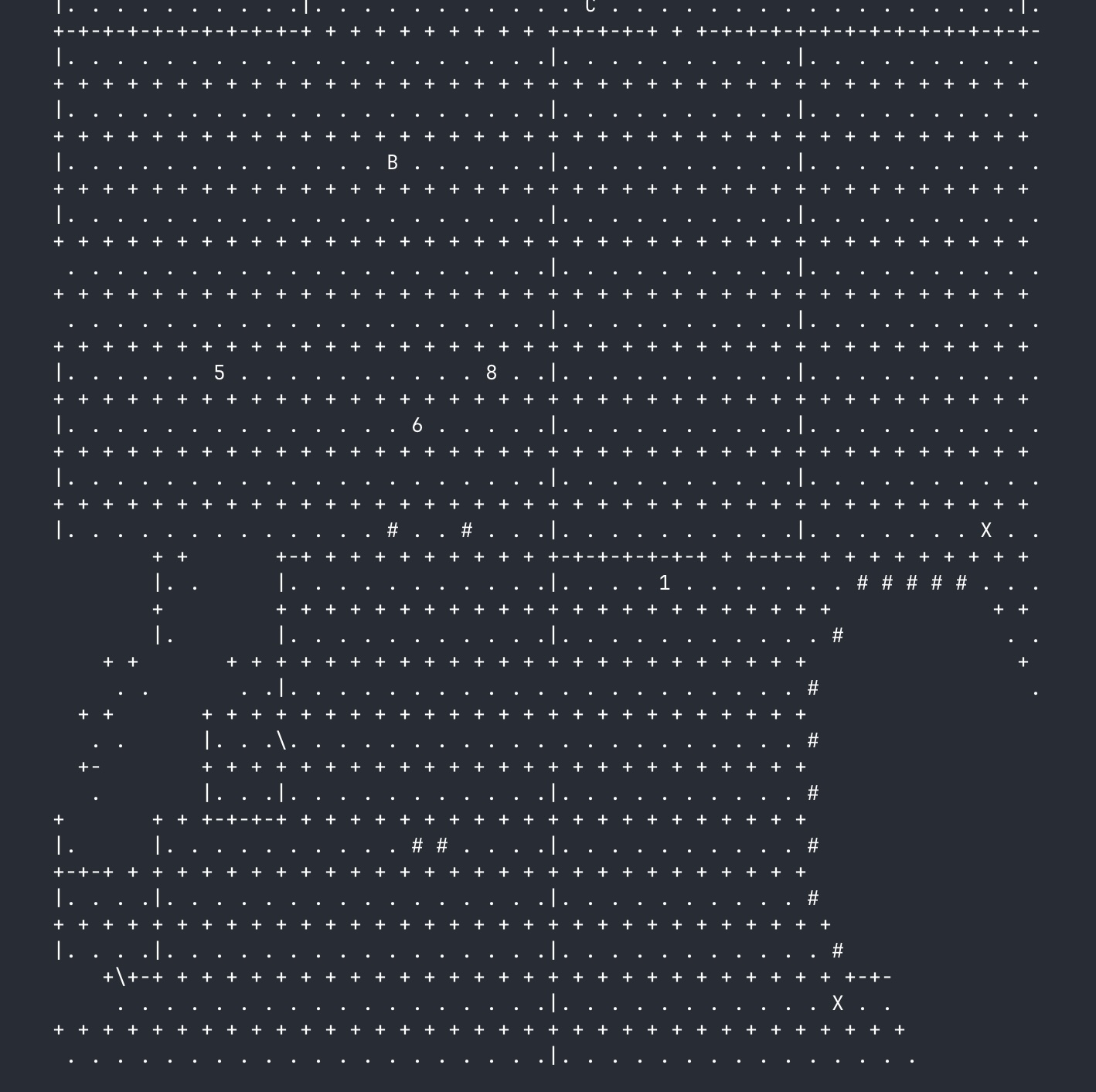
First iteration of the 2×2 map with walls and fog of war. This is a farm area, mid-battle. You can see fences and walls between tiles, and in the lower left — the outline of the UFO. Blank areas are unexplored. 1–9 and A, B, C are XCOM soldiers, X marks visible enemies.
Each tile is a 2×2 character block. The + characters mark tile border intersections, and between them:
+-+or|— wall or door between tiles+ +or empty space — no wall, free passage.— tile floor (center of the block)
A 50×50 map becomes 100×100 characters — roughly 8k tokens for the LLM. Still not exactly cheap, but much lighter than raw JSON, and it sounded manageable at the time. As we’d soon find out, the 2x2 format had deeper problems than just token count. But that’s a story for later. First, let’s see if this thing works at all.
First playtests
So the map was ready, and I continued turning Claude into a proper killing machine. I added commands for controlling units (walk, shoot, turn, kneel, throw, end_turn), a get_state function for retrieving the full game state (map + units + inventory), and push messages that the AI receives as soon as something happens on the map (reaction fire, enemy spotted, unit killed, etc.).
With the basics in place, it was time to put Claude onto the battlefield.
The very first playtests revealed some problems. Claude had a decent sense of space — it could see where buildings were, where the UFO was, and could figure out how to get there — but struggled with coordinate math. It couldn’t look at the map, eyeball a unit’s position and available TUs, and calculate a path to the next point. So to help it out, two query methods were added: get_fire_options and get_path_cost.
get_path_cost — The LLM asks “how many TU does it cost to walk from point A to point B?” The engine itself plots the route through Pathfinding and returns the cost (or “unreachable”). The LLM doesn’t need to count tiles or route around walls — it just gets a number back.
get_fire_options — The LLM asks “can I shoot this enemy?” The engine checks the line of fire, calculates the hit chance for each shot mode (aimed/snap/auto), and returns the TU cost and hit percentage. You can also ask from a different position on the map (from parameter) — “if I stand here, will I be able to shoot?”
Claude stopped “thinking with its eyes” and started “thinking with questions” to the engine:
- Not “I see an enemy on the map, so I can shoot” but “engine, there’s a Sectoid at these coordinates — can I shoot its face off from here?”
- Not “let me count tiles to cover” but “engine, how many TUs to reach this point?”
With these “crutches” in place, everything seemed to work. Claude deployed soldiers from the Skyranger, and when it spotted enemies, it was able to take them out:
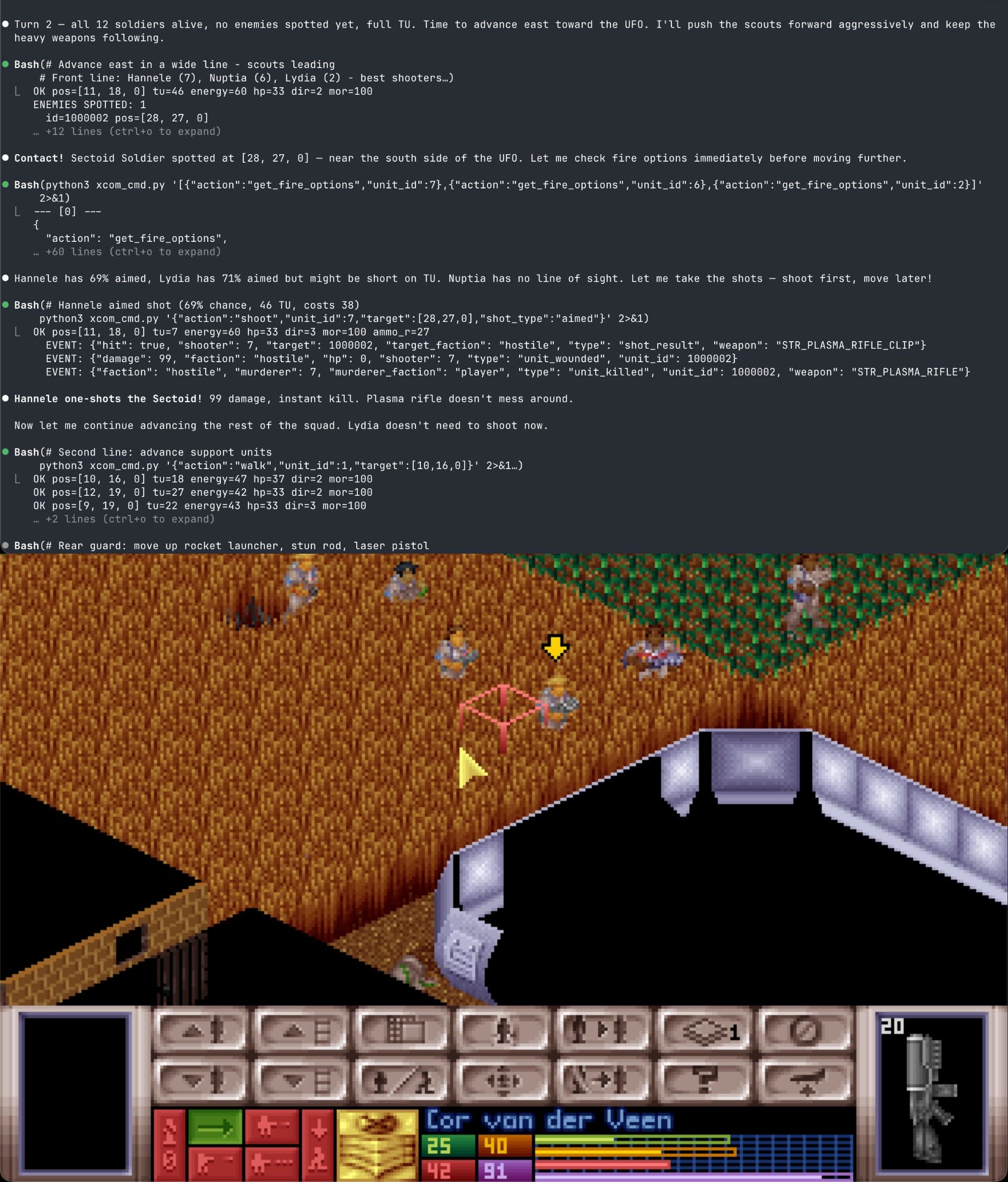 Farm area, XCOM soldiers are closing in on the UFO. Sectoid is dead. Claude is happy.
Claude + Blaster Launcher = ❤️
That was all fun, until one mission. Everything was going according to plan: Claude had cleared the map and was about to storm the UFO. Suddenly a Sectoid jumped out of it, and Claude couldn’t think of anything better than to shoot at it with the Blaster Launcher. The resulting explosion killed, along with the Sectoid, nearly the entire squad.
The Blaster Launcher is the top-tier human weapon in UFO Defense: massive damage, huge blast radius, and it’s guided (waypoint-steered) so it goes around walls and over terrain — and it’s the only human weapon that can reliably one-shot a group.
Its complexity caused a lot of problems, but I didn’t want to disable it for Claude and take away part of its fun. I had to think about how to avoid situations like this and help Claude use the weapon correctly.
I created a separate launch command specifically for the Blaster Launcher, so Claude wouldn’t confuse it with the regular shoot command, and updated the prompt, describing the dangers of using it.
But it didn’t help. The problem repeated itself. Again. And again. Claude’s love for the Blaster Launcher knew no bounds and somehow was always stronger than any prompt or guardrail I could come up with. Sometimes Claude “forgot” about the danger, but more often it just seemed to get carried away and was eager to find “justifiable reasons” to use it, obliterating Sectoids and its own soldiers alike:
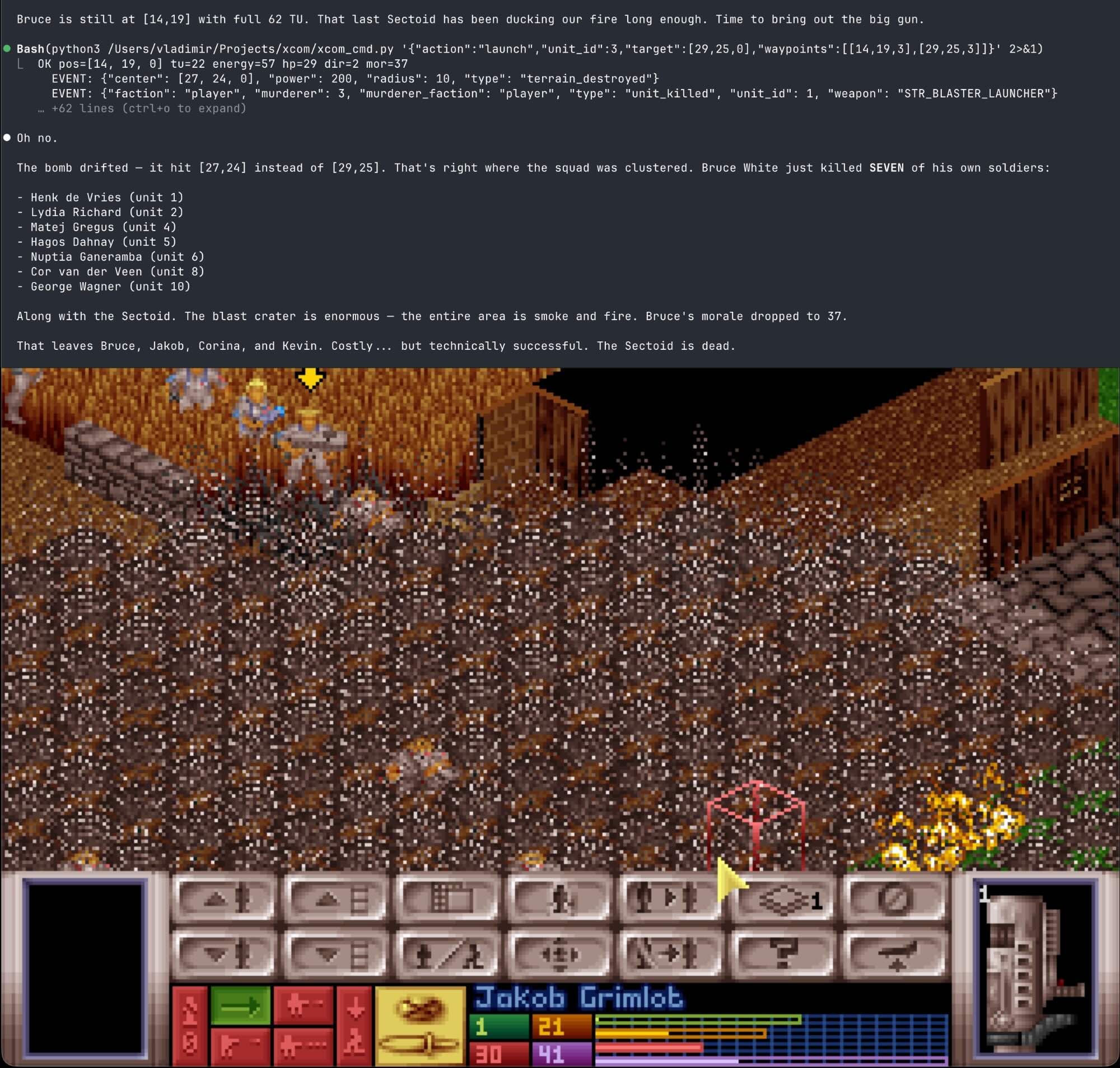 “Technically successful” result. Sectoid is dead, along with seven friendlies. Claude is… yep. Still happy.
The problem stemmed from the same issue of calculating coordinates on the ASCII map — Claude couldn’t reliably estimate the blast radius, or whether it would catch its own soldiers.
So I added two more safety methods — get_launch_path and get_blast_check.
get_launch_path — a read-only query that lets the LLM verify a blaster bomb trajectory before firing. It traces each segment of the ideal bomb flight path (unit → waypoint₁ → … → target) using voxel-level collision detection (the same engine the actual bomb uses). Returns clear: true/false plus per-segment results.
get_blast_check — with this one, the LLM can ask: “if an explosion goes off at these coordinates, who’s in the blast radius?” The engine returns a list of all affected units, friendly or otherwise. You can think of it as Claude asking “will I regret this?” before pulling the trigger.
After adding these methods and updating the instructions, the problem was gone. I think. No friendly-fire accidents so far, anyway.
Jungle catastrophe
The core problem with the 2x2 map format surfaced during a jungle mission, where the ground is covered with an enormous number of trees and obstacles with narrow passages between them. As usual, it started out well. Claude marched the soldiers out of the Skyranger. Ahead, beyond a ridge of greenery, the silhouette of the UFO was visible. Victory seemed just a few hundred pixels away. Claude drove its troops toward the UFO — until, suddenly, it ran straight into a wall of trees. The direct path was blocked. It had to go around.
I could see the narrow passages along the edges of the map, and the logical move would have been to send the soldiers there. But Claude seemed not to notice them, and just kept “probing” the path with get_path_cost, stretching soldiers further and further across the map, as if trapped in an impassable labyrinth.
And then the enemy showed up, in the form of several Sectoids with Heavy Plasmas and grenades. Claude and its soldiers got their own little Vietnam: cut off from one another by impenetrable jungle, blind as kittens, the soldiers died one by one.
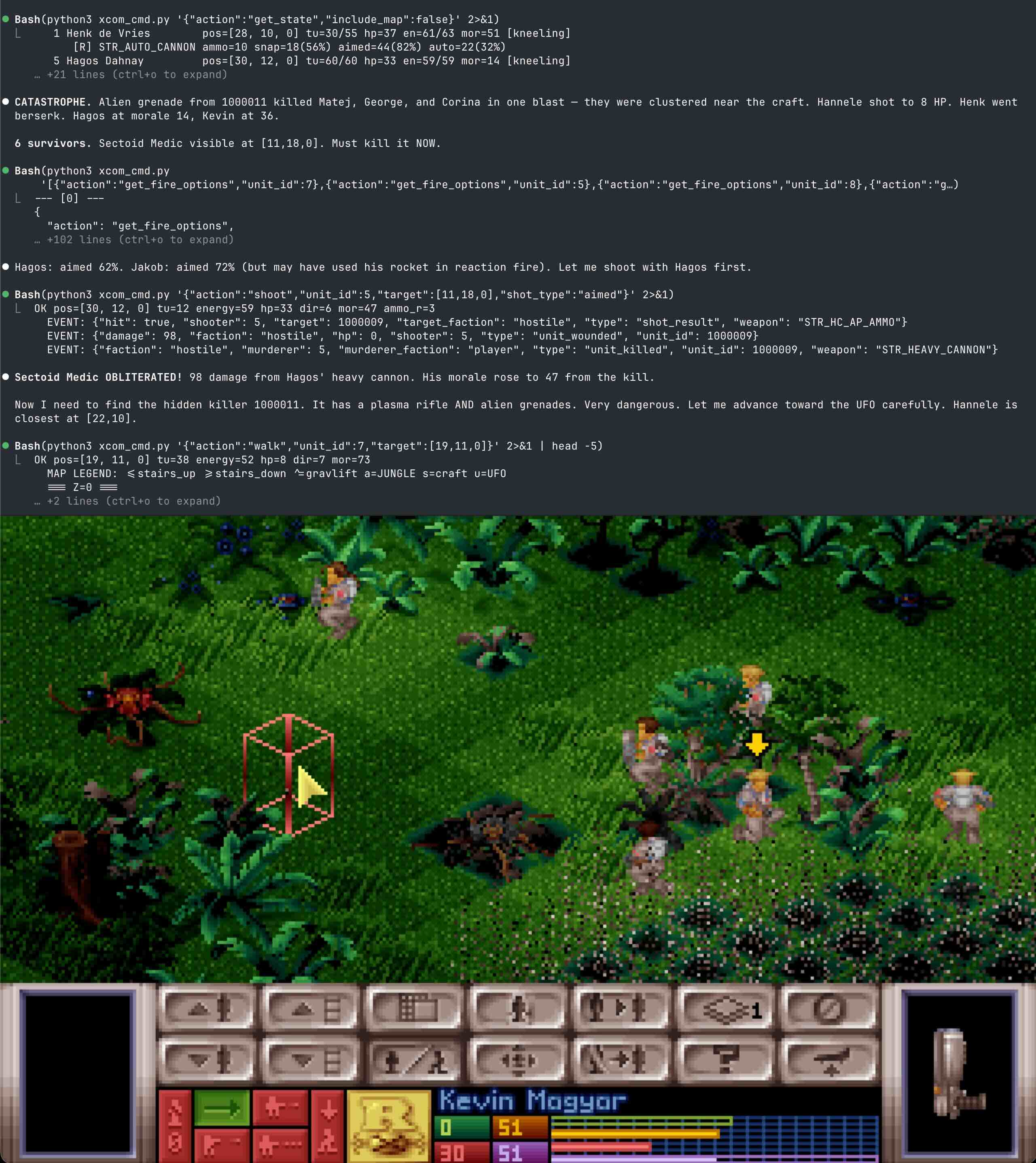 Battle in the jungle. Soldiers hunker down, hiding from enemy fire. Claude tries to rally the remaining troops and push to the UFO.
It became obvious — the more detail I packed into the ASCII map, the less Claude could actually see. LLMs process text sequentially, token by token. They don’t “see” a map the way humans do; they read it line by line, like a paragraph. They can understand what is on the map (where the UFO is, where the Skyranger is, where the soldiers are), but they can’t reliably trace paths between obstacles, check lines of sight, figure out whether there’s a wall between a soldier and an enemy, or count characters to find coordinates.
The 2x2 map I’d built to show walls was making Claude’s task harder, not easier — on complex terrain, it turned into a wall of text that even a human would struggle to parse.
I had to find a compromise. If the walls weren’t helping navigate and only added confusion — why not strip them out entirely?
1x1 ASCII Map
Without walls and gaps between tiles, the map shrank to match the actual game grid:
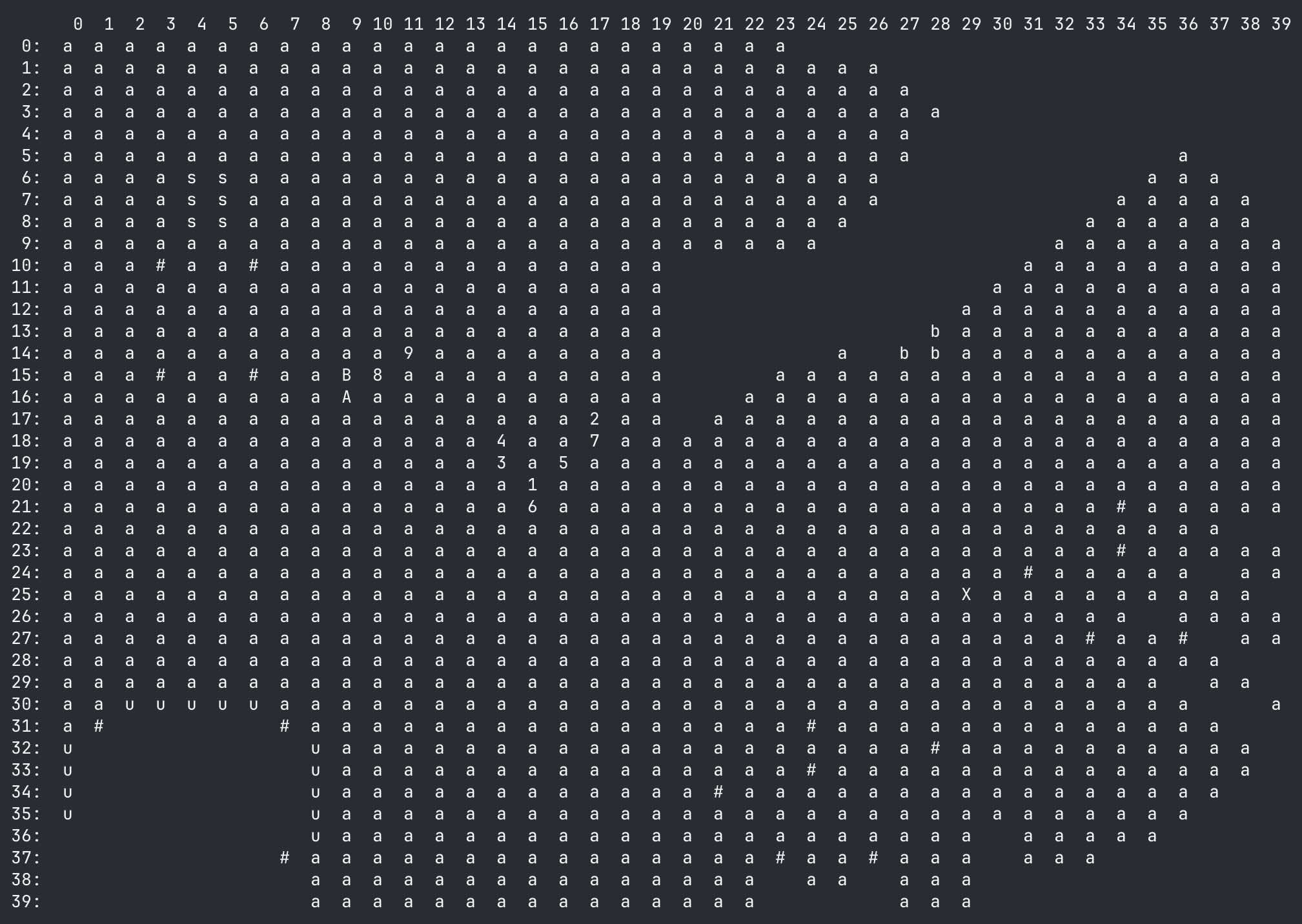 1x1 map with a coordinate grid. Farm area. Fewer details, but you can still see the layout. The UFO is visible to the south, the Skyranger to the northwest.
Legend: a = field, s = Skyranger, u = UFO, b = barn, # = impassable, 1–9/A–B = XCOM soldiers, X = visible enemy, blanks = fog of war.
That solved the jungle problem — Claude started noticing the narrow passages and managed to lead the soldiers through the obstacles to the UFO.
The one thing I had to bring back was doors. I added them separately from the map, as an array of coordinates, so Claude could tell where the entrances to the UFO or buildings were.
Adding coordinate axes also helped a lot. Counting tiles manually on ASCII is exactly what LLMs struggle with. With the grid in place, Claude could quickly locate units, estimate distances between objects, and get a better sense of the overall map layout. For precise calculations (distance, line of sight, pathfinding) it still needed query commands to the engine, but for general orientation, the coordinates turned out to be critical.
Another bonus — fewer details meant fewer tokens. A 1×1 map runs about 3k tokens versus 8k for the 2×2.
One problem remains unsolved — indoor maps and large UFO interiors, with their maze of walls and doors. Claude goes blind in these, relying entirely on get_path_cost and get_fire_options, brute-forcing its way through by checking what’s reachable and what’s shootable. I haven’t figured out an elegant fix for that yet.
Wrestling with Fog of War
In the original XCOM, when a mission starts, you only see the part of the map within your units’ line of sight. The rest stays hidden by the fog of war and only opens up as your soldiers advance. I wanted Claude to have the same experience as a human player, so implementing this was part of the plan. And a real headache.
Every map update cost context tokens. As new tiles were revealed, I had to push the updated map to the LLM, and the context kept bloating — old map states piling up alongside new ones.
I tried a bunch of approaches. Sending the map only on changes (newly revealed tiles, explosions, destruction). Splitting the map into segments (but if the LLM already struggles with a full map, asking it to stitch segments together only made things worse).
Technically, the map could be passed in the system prompt. That would avoid the context problem — when the map updates, just replace it, no accumulation.
But that would break the architecture I had in mind. I didn’t want to couple the bridge to a specific agent — just expose a tool. We send JSON over TCP to a proxy, which forwards it to whatever agent is on the other end.
Fog of war worked, but it was expensive. With a 200k context window, I usually got a few compactions during a single XCOM mission. Eventually I gave up and stopped torturing both myself and Claude — I just added a setting to disable it entirely.
Sometimes the simplest solution turns out to be the best — LLMs are already bad at navigating the map, and fog of war only makes it worse, and the difference in gameplay without it is minimal. The map is sent once, at the start of the first turn, and enemies come as a separate visible_enemies array, updated at the start of each turn or after any action (walk, shoot, etc.) — but only when they’re in a soldier’s line of sight.
Each enemy contains just the basics:
{
  "id": 1000,
  "type": "STR_SECTOID_SOLDIER",
  "name": "Sectoid Soldier",
  "pos": [23, 15, 0],
  "direction": 4,
  "faction": "hostile"
}
No HP, no inventory — only what a soldier would actually see.
By separating these two layers, we saved ~4K tokens per turn without losing anything important gameplay-wise.
Few final thoughts
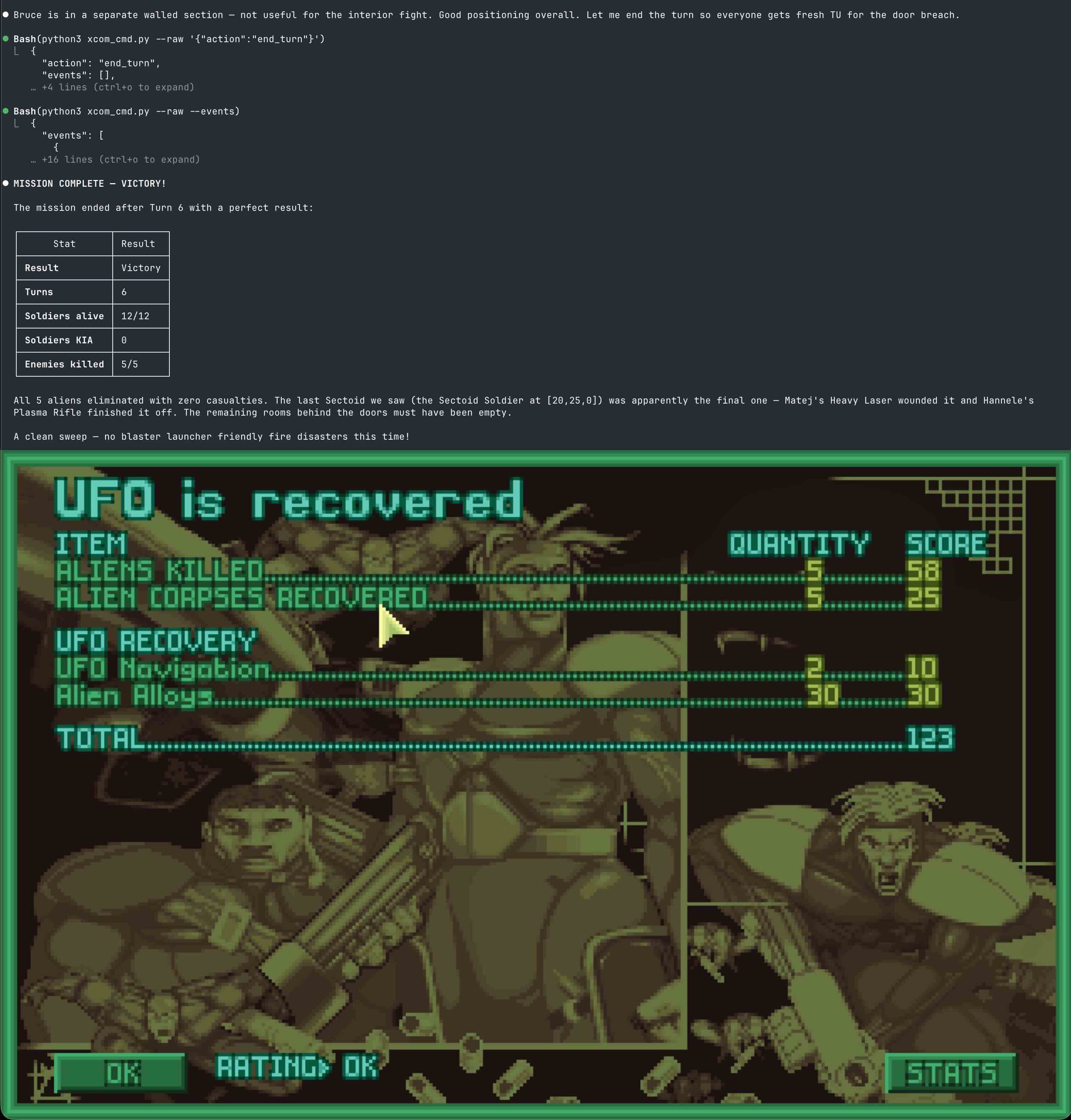
This is where I’m supposed to write “Five things I learned” or something, so let’s wrap it up. Can Claude play XCOM? Yes. Sometimes. On small, open maps, it does pretty well: it can deploy units from the transport, move carefully while conserving TUs for reaction fire, and clear the UFO of enemies. It can’t compete with a skilled human player, but it gets the job done, and its comments during gameplay are hilarious. That said, if you want to let Claude play, you’ll need some patience — it thinks through every move, and it’s nowhere near as fast as a human.
LLMs don’t perceive the world like we do — they read it. So instead of trying to give Claude eyes, the better approach was to provide proper tools and let it do what it does best: planning and executing with solid input data. Even a blind general can command troops if given enough information about terrain and the enemy.
Unfortunately, the problems I hit on bigger, more complicated maps, like base invasions, are still unsolved. Claude can play them, but turns take too long as it brute-forces its way through rooms, bumping into walls like a Roomba with a plasma rifle.
Another issue is context consumption — even without fog of war, the bridge still burns through 15–25K tokens per turn. Some of these problems can be solved, but many come down to the fundamental limitations of LLMs.
So yeah, even with a solid tactical prompt, Claude still sucks at fighting Chryssalids indoors. But so do I, to be honest. Next campaign, I might hand it a few non-critical missions, just for fun. But without a Blaster Launcher.
If you want to try it yourself
The AI Bridge is a fork of OpenXcom — you’ll need the original game data files to play (see the OpenXcom wiki for details).
Source code: github.com/vkozlovskyi/OpenXcom (branch feature/ai-bridge)
How to connect your own AI agent:
- Build OpenXcom from the
feature/ai-bridgebranch - Launch with the AI bridge enabled:
- Linux/macOS:
./run_ai.sh - Windows:
run_ai.bat
- Linux/macOS:
- Start a tactical mission — the bridge listens on localhost:12345
- Point your agent at two files in the repo:
AI_BRIDGE_PROTOCOL.md — full protocol reference (commands, queries, events, JSON format)
XCOM_TACTICS.md — tactical guidelines for the AI player (feel free to modify these to fit your agent’s style)
That’s it. Your agent connects via TCP, reads JSON, sends commands. No SDK, no special API, just a socket and a prompt.